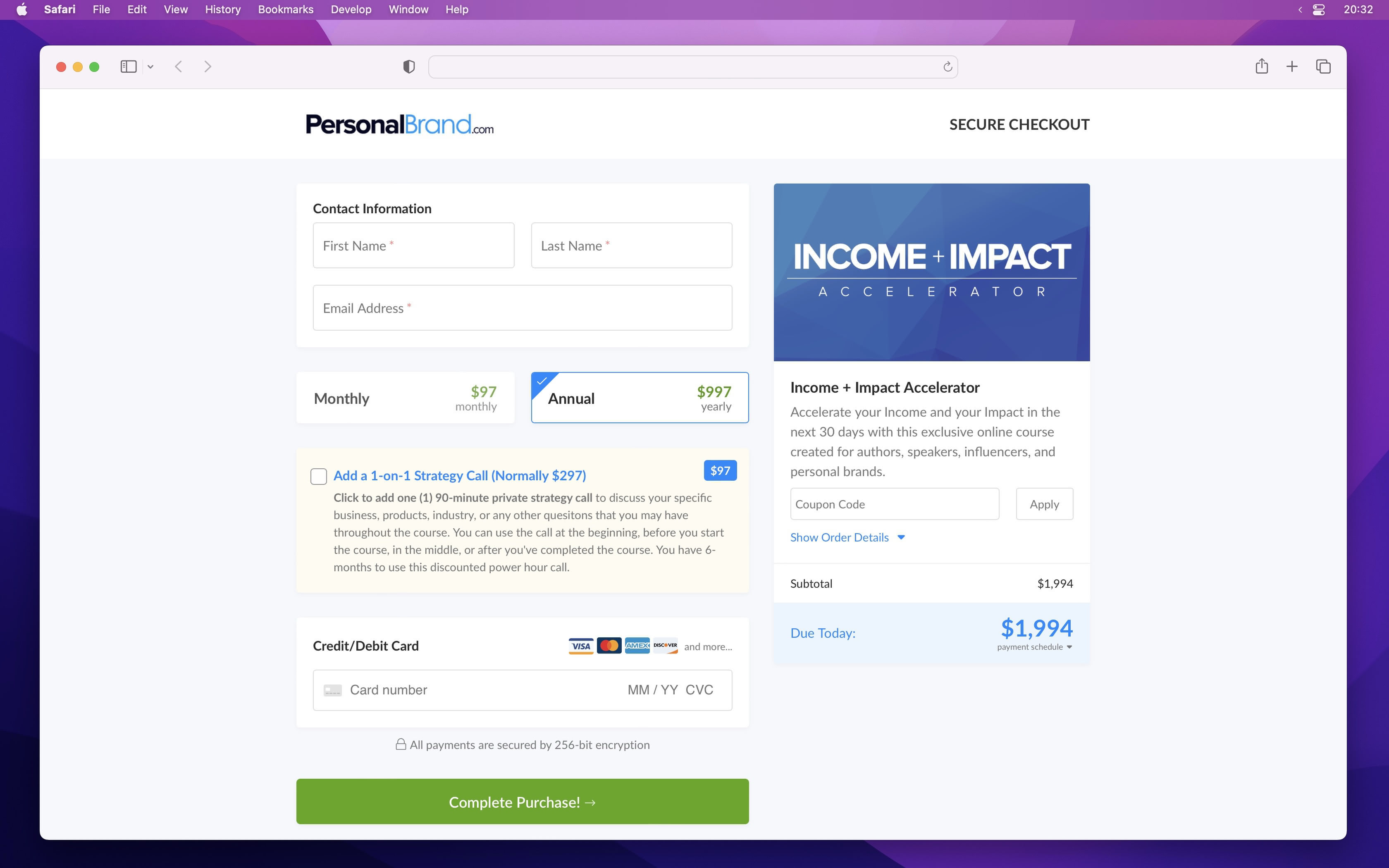
Checkout Examples Checkout page examples for online offers.

Use these patterns to decide how your checkout should work for digital products, courses, coaching, subscriptions, payment plans, order bumps, and one-click upsells.

Try Spiffy risk‑free for 30 days.

Spiffy checkout example with product details, payment options, and order summary

Checkout patterns

Start with the job the checkout has to do.

A good checkout example is not only a layout. It is a choice about payment terms, buyer intent, order value, fulfillment, and what should happen after the sale.

Digital products

Digital product checkout

Use a direct checkout when the buyer already understands the offer and needs a quick path to pay and get access.

Best for Templates, downloads, workshops, small productized offers

  • Keep the product summary short and specific
  • Collect the fields needed for delivery and support
  • Add a relevant order bump only when it helps the buyer
Product setup

Higher-ticket offers

Course or coaching checkout

Use a more complete checkout when the offer needs payment choices, clear expectations, and a clean handoff after purchase.

Best for Courses, cohorts, coaching intensives, consulting packages

  • Show pay-in-full and payment-plan options together
  • Use custom fields for onboarding details
  • Trigger course access, tags, or team follow-up after payment
Payment plans

Recurring revenue

Subscription checkout

Use a subscription checkout when the buyer is joining something ongoing and needs to understand the billing cadence before paying.

Best for Memberships, retainers, subscriptions, recurring services

  • Make the recurring price and billing term obvious
  • Let customers manage their billing details after purchase
  • Use lifecycle automations for signup, renewal, and cancellation moments
Subscriptions

Flexible payments

Payment plan checkout

Use a payment-plan checkout when the offer is valuable but the full price creates friction at the decision point.

Best for Premium programs, annual offers, done-for-you work, events

  • Show the amount due today next to the remaining schedule
  • Offer a pay-in-full option when there is a clear reason
  • Keep follow-up tied to collected payments, not just signup intent
Payment plans

Before payment

Checkout with an order bump

Use an order bump when there is a small, closely related add-on that makes sense before the buyer completes the first payment.

Best for Bonus templates, extra sessions, support add-ons, implementation help

  • Keep the bump lower-friction than the main offer
  • Explain the add-on in one or two plain sentences
  • Avoid unrelated add-ons that make the checkout feel cluttered
Upsells and order bumps

After payment

One-click upsell flow

Use a post-purchase upsell when the next offer is easier to consider after the buyer has already made the first commitment.

Best for Premium upgrades, annual plans, advanced modules, service add-ons

  • Make the accept and decline paths clear
  • Use the first purchase to decide which offer appears next
  • Trigger fulfillment and reporting when the upsell is accepted
One-click upsells

On-page buying

Embedded checkout

Use an embedded checkout when the sales page already answers the buyer questions and the payment step should happen in place.

Best for Long-form sales pages, webinar pages, partner pages, campaign pages

  • Keep the checkout close to the offer section
  • Avoid sending the buyer through an unnecessary extra page
  • Use the same checkout setup as your hosted or custom-domain version
Checkout pages

Brand continuity

Custom-domain checkout

Use a custom-domain checkout when the buying experience needs to feel connected from ad, email, or sales page through payment.

Best for Launches, paid traffic, partner offers, branded campaigns

  • Keep the URL aligned with the offer or campaign
  • Match the checkout to the surrounding brand experience
  • Connect order data to analytics, CRM, and fulfillment tools
Checkout pages

Build from the example

The checkout is only one part of the revenue flow.

Once the buyer pays, Spiffy can help route the customer into fulfillment, follow-up, analytics, subscriptions, payment recovery, and the tools your team already uses.

Checkout example questions?

Use these answers to choose a checkout pattern before you build the page.

What makes a good checkout page example?

A useful checkout example shows more than a layout. It shows the offer summary, payment options, trust signals, order bump or upsell path, and what happens after the customer pays.

Which checkout example should I use for a course or coaching offer?

Higher-ticket course and coaching offers usually need clear payment options, short onboarding fields, and follow-up automation after purchase. If the price creates friction, pair the checkout with payment plans.

Should subscriptions use a different checkout pattern?

Yes. Subscription checkouts should make the recurring price, billing cadence, trial terms, and cancellation expectations easy to understand before the customer pays. See subscription billing.

When should I use an embedded checkout?

Use an embedded checkout when the sales page already explains the offer and the buyer should complete payment without leaving the page. Hosted checkout pages work better when the checkout needs its own focused URL.

Do checkout examples need order bumps or upsells?

Only when the extra offer is closely related to the purchase. A good order bump or one-click upsell should make the buying path more useful, not more cluttered.

Ready to build

Start with the checkout pattern your offer needs.

Build the payment step, add the right follow-up path, and keep the revenue data tied to the customer.