Because I can automate payment processing, I spend much less time playing with the software, and can dedicate more energy towards my clients for my services.
Automations Automation workflows for your checkout and billing.
Purchases, renewals, failed payments, card updates, payment retries, upsells, CRM actions, fulfillment, and webhooks can all trigger automatically from the checkout and billing events Spiffy already sees.
Try Spiffy risk‑free for 30 days.
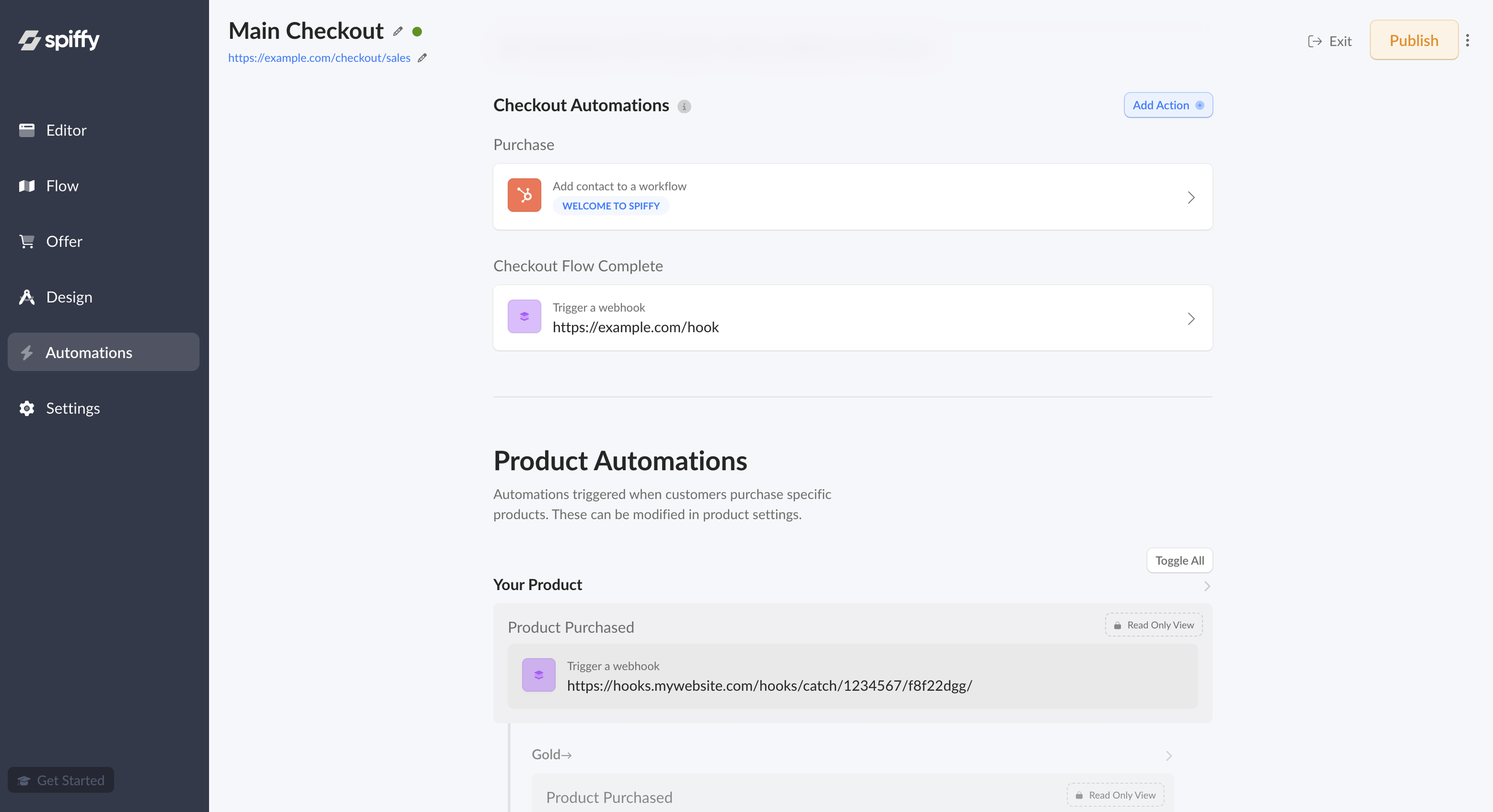
Automation overview
Connect what people buy to what should happen next.
Spiffy automations cover the purchase moment and the billing lifecycle that follows. Use them for customer communication, access, CRM data, webhooks, dunning management, payment retries, and failed-payment recovery without adding another disconnected workflow tool.
Read the automation guidePurchase events
Run actions from Purchase, Checkout Flow Complete, product purchase, option purchase, and accepted upsells.
Billing events
Respond to Payment Failed, Card Expiring, Card Updated, Subscription Payment, and Payment Plan Payment events.
Dunning and payment recovery
Pair failed payment retries with dunning reminders and card updater links from the customer portal.
CRM workflows
Apply tags, start sequences, update lists, and keep customer records aligned with the actual sale.
Webhooks
Send checkout and billing events into custom tools, Zapier, Make, or your internal systems.
Account coverage
Use account-level rules, product rules, option rules, subscription rules, and payment plan rules where each one makes sense.
Post-purchase automations
Purchase happens. Everything else follows.
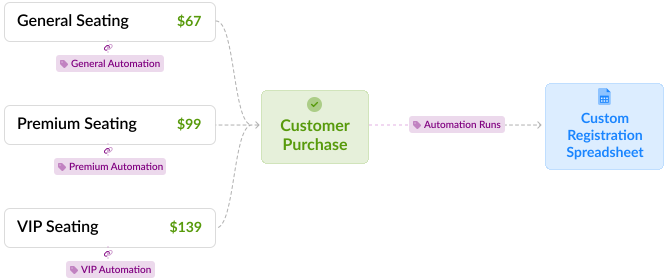
Set actions on the exact purchase event that matters: the checkout purchase, the selected option, the accepted upsell, or the completed checkout flow after every offer has been accepted or declined.
Use the same automation model across the funnel.
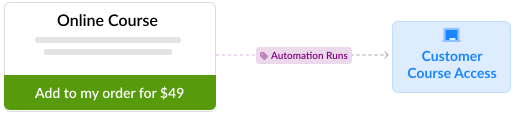
Spiffy product and option automations come from the same event/action setup used in the app. Choose the event, add the integration action, then keep an eye on activity through automation logs.
- Purchase
- Checkout Flow Complete
- Post-Purchase Upsell
- Option purchase
- Automation Logs
- Tag and segment buyers Send the right customer data to ActiveCampaign, Keap, HubSpot, or your CRM.
- Start the right onboarding Trigger different welcome flows for buyers, VIP options, upgrades, or add-ons.
- Pass clean data downstream Notify fulfillment, membership tools, reporting tools, or custom endpoints.
Billing events
More than 25 billing events, without a separate setup.
Account automations and billing events are built around the same operational idea: when the payment state changes, the right follow-up can run immediately.
Use broad account rules for standard recovery, or add specific rules for subscriptions and payment plans when those offers need different handling.
See Billing AutomationCommon billing triggers
- Payment Failed Start retry, reminder, and dunning follow-up.
- Card Expiring or Card Updated Ask customers to update details or sync the new payment method state.
- Subscription Payment Update customer records, revenue reporting, or access after renewals.
- Payment Plan Payment Follow up around installments, missed payments, upcoming payments, and completion.
- Consent and lifecycle events Keep email preferences, disputes, cancellations, and other account events connected.
Failed payment recovery
Recover failed payments with billing automation.
Spiffy gives failed-payment recovery a direct path inside the billing workflow. Build dunning automation for subscriptions and payment plans with retry logic, customer reminders, and card update links through the Customer Portal.
Instead of exporting failed charges to another tool, you can trigger recovery actions from the same purchase, subscription, payment plan, and account events Spiffy already tracks.
- Payment retries
- Card updater links
- Dunning reminders
- Recovered-payment follow-up
How recovery can play out
- 1Payment attempt fails The billing event fires as soon as the payment fails.
- 2Retry logic runs Spiffy keeps the next billing attempt tied to the customer, subscription, or payment plan.
- 3Card updater link is sent Customers get a direct path to fix the payment method.
- 4Dunning follow-up runs Your email or CRM flow can remind the customer without turning recovery into manual chasing.
- 5Payment is recovered Billing status, access, and customer data stay in sync.
Retry the charge
Use payment retry workflows when a renewal, installment, or account billing attempt fails.
Prompt the customer
Trigger reminder messages that explain what happened and point customers to the next step.
Update the card
Give customers a secure path to update payment details through the billing portal.
Sync the recovery
When the payment succeeds, keep access, billing status, CRM records, and reporting aligned.
Recovery can be broad or offer-specific.
Use account-level recovery for common failed billing events, then add specific rules for subscriptions or payment plans when a recurring offer, installment schedule, access rule, or customer message needs different handling.
Automation actions
Add the action once, then let events run it.
The app's automation UI is built around event groups and action rows, so the setup stays familiar across checkout and billing workflows.
- Apply CRM tags Segment buyers by checkout, option, subscription, payment plan, or offer.
- Start sequences Send welcome flows, recovery reminders, onboarding, or win-back messaging.
- Grant access Connect the successful purchase to membership, fulfillment, or internal delivery steps.
- Send webhooks Push purchase and billing data to custom systems that need to react quickly.
- Use integrations Keep your marketing, CRM, analytics, and ops tools tied to the transaction.
- Review automation logs See the event, related customer, order, subscription, payment plan, and actions that ran.
Trigger levels
Choose the trigger level that matches the job.
You do not need every workflow to live in the same place. Use broad rules for broad billing logic, and specific rules where the buyer path matters.
- Checkout purchases Run actions when an order completes through a specific checkout.
- Product options Apply different logic for tiers, packages, payment choices, or add-ons.
- Upsells and downsells Route accepted offers into the right fulfillment and follow-up workflows.
- Subscriptions Respond to renewals, trials, plan changes, unpaid status, and cancellations.
- Payment plans Follow up around installments, failed payments, upcoming payments, and completions.
- Account billing Handle account-level failed payments, card updates, disputes, and consent events.
If you're looking for a really powerful but easy to use checkout system, I think you can just stop looking right now and get Spiffy. It's that good.

Spiffy is the easiest software tool I've ever used, and it solves the complex checkout problem. Spiffy makes collecting payments super easy and fast. I use it for all of my clients.

Automation questions?
Need help mapping your workflows? Get in touch.
What can billing automations do in Spiffy?
How do Spiffy automations get set up?
Which events can I send to my CRM or automation tool?
Can automations be different by product, option, or checkout?
Can Spiffy automatically retry failed payments?
Is Spiffy failed payment recovery software?
Can Spiffy handle dunning management workflows?
Can your team help map the recovery workflow?
Can I use webhooks or Zapier-style workflows?
Ask about Spiffy on
Automate your checkout workflows.
Turn purchases, billing events, failed payments, dunning reminders, and payment retries into connected follow-up without adding more manual admin.